Percentage Calculator
Please provide any two values below and click the "Calculate" button to get the third value.
Percentage Calculator in Common Phrases
Percentage Difference Calculator
Percentage Change Calculator
Please provide any two values below and click the "Calculate" button to get the third value.
What is a percentage?
Percentages are computed by multiplying the value of a ratio by 100. For example, if 25 out of 50 students in a classroom are male, 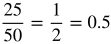 . The value of the ratio is therefore 0.5, and multiplying this by 100 yields:
0.5 × 100 = 50
In other words, the ratio of 25 males to students in the classroom is equivalent to 50% of students in the classroom being male.
Percentage formula
Although the percentage formula can be written in different forms, it is essentially an algebraic equation involving three values.
P × V1 = V2
Here, P denotes the percentage, V1 is the original amount to which the percentage is applied, and V2 is the result after the percentage operation. The tool automatically turns the entered percent into its decimal counterpart before performing the calculation. When you ask the calculator to find the percentage itself, it returns the actual percent value rather than the decimal form.
EX: P × 30 = 1.5
| P = |
|
= 0.05 × 100 = 5% |
When you work out the problem by hand, the equation expects the percentage in decimal form, so after finding P you have to multiply it by 100 to turn it back into a percent. This is precisely what the online calculator does, except it lets you enter the percentage directly instead of converting it yourself.
Percentage difference formula
The percent difference between two numbers is obtained by taking the absolute gap between them, dividing that by the average of the two values, and then multiplying by 100. The final figure is expressed as a percent rather than a decimal. See the formula below for details.
| Percentage Difference = |
|
× 100 |
| EX: |
|
= |
|
= 0.5 = 50% |
Percentage change formula
To compute a percent increase or decrease, you compare the change between two figures with the original number. In practice this means using the absolute change, dividing it by the starting value, and expressing the quotient as a percent, which tells you how much the original amount has varied.
The calculator shown above determines a rise or fall of a given percent on a base figure. It first converts the supplied percent into its decimal equivalent, then either adds (for an increase) or subtracts (for a decrease) that decimal from 1. Multiplying the base number by the resulting factor yields the adjusted value. The example below illustrates the process.
EX: 500 increased by 10% (0.1)
500 × (1 + 0.1) = 550
500 decreased by 10%
500 × (1 – 0.1) = 450